

Μετάβαση σε περιεχόμενο
View in the app

A better way to browse. Learn more.

Mammyland

A full-screen app on your home screen with push notifications, badges and more.

To install this app on iOS and iPadOS
  1. Tap the Share icon in Safari
  2. Scroll the menu and tap Add to Home Screen.
  3. Tap Add in the top-right corner.
To install this app on Android
  1. Tap the 3-dot menu (⋮) in the top-right corner of the browser.
  2. Tap Add to Home screen or Install app.
  3. Confirm by tapping Install.

Φτιάξτε πανέμορφα χριστουγεννιάτικα στολίδια από χαρτόνι


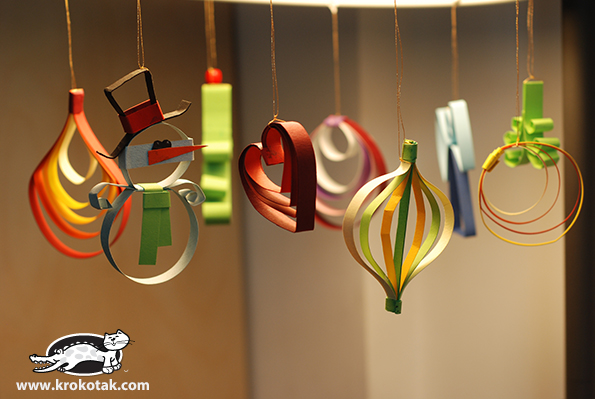
  • <p>Χριστουγεννιάτικες μπάλες, χιονάνθρωποι, καρδούλες, δεντράκια, αγγελάκια...Αυτά τα στολίδια φτιάχνονται πανεύκολα και είναι πραγματικά υπέροχα!</p>

omkLsNv.jpg

PDTTG8K.jpg

ldc5Dec.jpg

Ry56kMF.jpg

ZBiSS4K.jpg

PWKFOVi.jpg

6gW4ZsE.jpg

dP9PV3p.jpg

Σχόλια Χρηστών

Recommended Comments

Δημοσίευση

Είναι υπέροχη ιδέα! Τα φτιάξαμε με τα παιδιά στο Κατηχητικό που κάνω, και κατενθουσιάστηκαν! Πήραν χαρτόνια και για το σπίτι, και μου ζήτησαν να φτιάξουμε και την επόμενη φορά!

Account

Navigation

Αναζήτηση

Configure browser push notifications

Chrome (Android)
  1. Tap the lock icon next to the address bar.
  2. Tap Permissions → Notifications.
  3. Adjust your preference.
Chrome (Desktop)
  1. Click the padlock icon in the address bar.
  2. Select Site settings.
  3. Find Notifications and adjust your preference.