

Μετάβαση σε περιεχόμενο
View in the app

A better way to browse. Learn more.

Mammyland

A full-screen app on your home screen with push notifications, badges and more.

To install this app on iOS and iPadOS
  1. Tap the Share icon in Safari
  2. Scroll the menu and tap Add to Home Screen.
  3. Tap Add in the top-right corner.
To install this app on Android
  1. Tap the 3-dot menu (⋮) in the top-right corner of the browser.
  2. Tap Add to Home screen or Install app.
  3. Confirm by tapping Install.

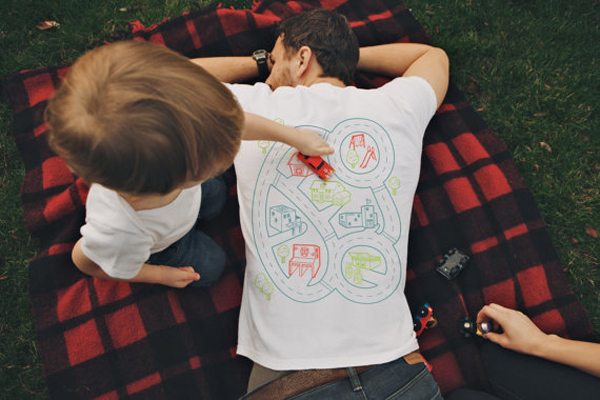
Ζωγραφίστε το μπλουζάκι του μπαμπά!


  • <p>Όλα τα παιδάκια τρελαίνονται για τη ζωγραφική και περισσότερο όταν δεν περιορίζονται σε μια κόλα χαρτί.</p>

Φορέσετε ένα λευκό μπλουζάκι που προφανώς έχετε για πέταμα και να αφήσετε το παιδάκι να δημιουργήσει στην πλάτη σας! Μπορείτε να ζωγραφίσετε τους δρόμους μιας πόλης και στη συνέχεια να παίξει με τα αυτοκινητάκια του.

Το παιδί θα απολαύσει το παιχνίδι και εσείς το πιο ευχάριστο μασάζ στην πλάτη!

Καλή διασκέδαση!

CuSsEbp.jpg

kp8T4TN.jpg

Σχόλια Χρηστών

Recommended Comments

Δεν υπάρχει κάποιο σχόλιο

Account

Navigation

Αναζήτηση

Configure browser push notifications

Chrome (Android)
  1. Tap the lock icon next to the address bar.
  2. Tap Permissions → Notifications.
  3. Adjust your preference.
Chrome (Desktop)
  1. Click the padlock icon in the address bar.
  2. Select Site settings.
  3. Find Notifications and adjust your preference.