

Μετάβαση σε περιεχόμενο
View in the app

A better way to browse. Learn more.

Mammyland

A full-screen app on your home screen with push notifications, badges and more.

To install this app on iOS and iPadOS
  1. Tap the Share icon in Safari
  2. Scroll the menu and tap Add to Home Screen.
  3. Tap Add in the top-right corner.
To install this app on Android
  1. Tap the 3-dot menu (⋮) in the top-right corner of the browser.
  2. Tap Add to Home screen or Install app.
  3. Confirm by tapping Install.

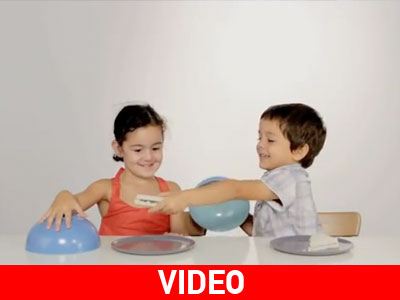
Τα παιδιά μοιράζονται...(video)


  • <p>Δείτε τι μας έδειξε ένα πείραμα που διεξήχθη στην Ισπανία από το κίνημα «Αction Against Hunger» που αφορά την αντίδραση των παιδιών όταν έρχονται αντιμέτωπα με «το δίλημμα».</p>

Το πείραμα έχει ως εξής: Η δασκάλα βάζει δυο παιδιά σε ένα δωμάτιο, με δυο πιάτα σκεπασμένα για το κάθε παιδί. Μόλις ξεσκεπάζουν τα πιάτα τους και βλέπουν πως μόνο το ένα πιάτο έχει μέσα τοστ με σοκολάτα, αμέσως το κόβουν στη μέση και το μοιράζονται...

Στη σημερινή κοινωνία της αφθονίας των τροφίμων, 3,5 εκατομμύρια παιδιά εξακολουθούν να πεθαίνουν από την πείνα κάθε χρόνο.

Θα πρέπει να μάθουμε από αυτά και να αρχίσουμε κ εμείς οι «μεγάλοι» να μοιραζόμαστε...

Σχόλια Χρηστών

Recommended Comments

Δεν υπάρχει κάποιο σχόλιο

Account

Navigation

Αναζήτηση

Configure browser push notifications

Chrome (Android)
  1. Tap the lock icon next to the address bar.
  2. Tap Permissions → Notifications.
  3. Adjust your preference.
Chrome (Desktop)
  1. Click the padlock icon in the address bar.
  2. Select Site settings.
  3. Find Notifications and adjust your preference.