

Μετάβαση σε περιεχόμενο
View in the app

A better way to browse. Learn more.

Mammyland

A full-screen app on your home screen with push notifications, badges and more.

To install this app on iOS and iPadOS
  1. Tap the Share icon in Safari
  2. Scroll the menu and tap Add to Home Screen.
  3. Tap Add in the top-right corner.
To install this app on Android
  1. Tap the 3-dot menu (⋮) in the top-right corner of the browser.
  2. Tap Add to Home screen or Install app.
  3. Confirm by tapping Install.

Ονειρεμένες σουίτες για παιδιά


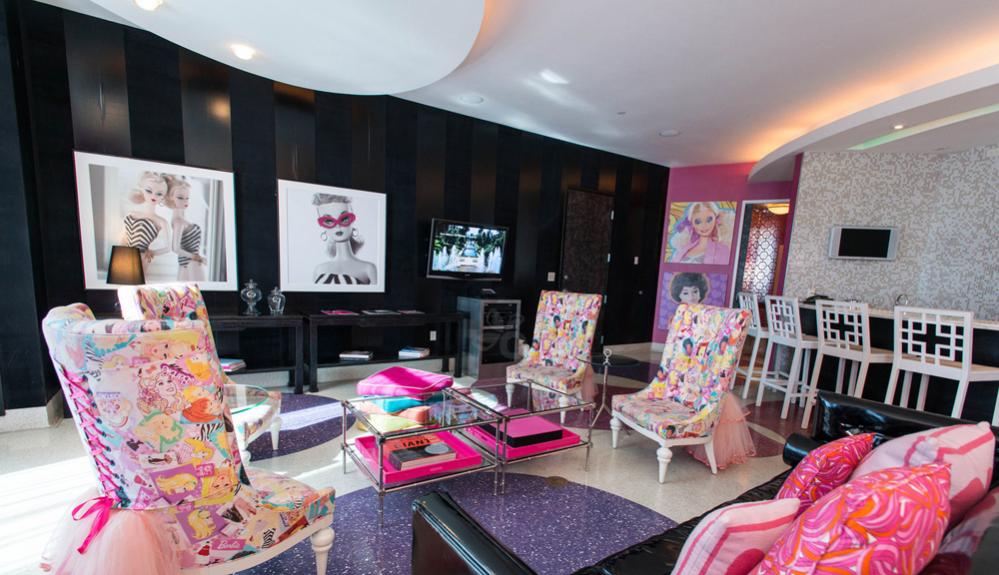
  • <p>Η διαμονή σε μία από τις σουίτες αυτές μοιάζει με όνειρο και ξεπερνά ακόμα και τη φαντασία κάθε παιδιού. Εμπνευσμένες από τους αγαπημένους μας παιδικούς ήρωες όπως την barbie, τον mickey mouse και τον bob τον σφουγγαράκι μικροί και μεγάλοι μπορούν να ζήσουν μια αξέχαστη και παραμυθένια εμπειρία.</p>

Η σουίτα της barbie στο The Palms

UyJZ0Df.jpg

fhdaUzX.jpg

7JtKFCY.jpg

Η σουίτα των minions στο Loews Portofino Bay Hotel

RiYOzZI.jpg

aAtHviy.jpg

Η σουίτα του Μίκυ Μάους στο Disneyland Hotel

HN15xrp.jpg

l5RIkjx.jpg

CkMFFJr.jpg

B8Q275q.jpg

Eloise Suite στο The Plaza

2bRW3Xw.jpg

Οι σουίτες του Μπομπ Σφουγγαράκη και της Ντόρας, Nickelodeon Suites Resort

71x6rcm.jpg

Σχόλια Χρηστών

Recommended Comments

Δεν υπάρχει κάποιο σχόλιο

Account

Navigation

Αναζήτηση

Configure browser push notifications

Chrome (Android)
  1. Tap the lock icon next to the address bar.
  2. Tap Permissions → Notifications.
  3. Adjust your preference.
Chrome (Desktop)
  1. Click the padlock icon in the address bar.
  2. Select Site settings.
  3. Find Notifications and adjust your preference.