

Μετάβαση σε περιεχόμενο
View in the app

A better way to browse. Learn more.

Mammyland

A full-screen app on your home screen with push notifications, badges and more.

To install this app on iOS and iPadOS
  1. Tap the Share icon in Safari
  2. Scroll the menu and tap Add to Home Screen.
  3. Tap Add in the top-right corner.
To install this app on Android
  1. Tap the 3-dot menu (⋮) in the top-right corner of the browser.
  2. Tap Add to Home screen or Install app.
  3. Confirm by tapping Install.

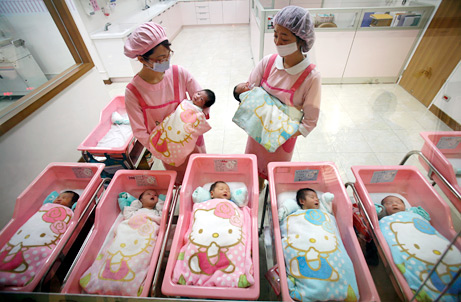
Ένα παραμυθένιο μαιευτήριο "Hello Kitty"


  • <p>Αυτό το υπέροχο μαιευτήριο με θέμα τη διάσημη γατούλα "Hello Kitty" βρίσκεται στην Taiwan. Αποτελείτε από 30 δωμάτια και δημιουργήθηκε με σκοπό να απομακρύνει το στρες από τις μέλλουσες μανούλες.</p><p>
    </p><p>
    <span style="font-size:14px;"> </span></p>

Τα πάντα μέσα στο μαιευτήριο είναι εξ'ολοκλήρου διακοσμημένα με την αγαπημένη φιγούρα της "Ηello Kitty". Οι κουρτίνες, τα έπιπλα, οι κουβέρτες, οι τοίχοι,τα σεντόνια, ακόμα και οι στολές των γιατρών είναι έχουν θέμα τη μικρή λευκή γατούλα.

TCBpTpP.jpg

eB0ygDQ.jpg

ojqVAto.jpg

Asvw9kz.jpg

Ο διευθυντής της κλινικής ανέφερε μάλιστα ότι μια παραμυθένια και ευχάριστη ατμόσφαιρα μπορεί να μειώσει το άγχος, τον φόβο και τον πόνο που σχετίζονται με τον τοκετό.

OJLzOKC.jpg

Σχόλια Χρηστών

Recommended Comments

Δεν υπάρχει κάποιο σχόλιο

Account

Navigation

Αναζήτηση

Configure browser push notifications

Chrome (Android)
  1. Tap the lock icon next to the address bar.
  2. Tap Permissions → Notifications.
  3. Adjust your preference.
Chrome (Desktop)
  1. Click the padlock icon in the address bar.
  2. Select Site settings.
  3. Find Notifications and adjust your preference.