

Μετάβαση σε περιεχόμενο
View in the app

A better way to browse. Learn more.

Mammyland

A full-screen app on your home screen with push notifications, badges and more.

To install this app on iOS and iPadOS
  1. Tap the Share icon in Safari
  2. Scroll the menu and tap Add to Home Screen.
  3. Tap Add in the top-right corner.
To install this app on Android
  1. Tap the 3-dot menu (⋮) in the top-right corner of the browser.
  2. Tap Add to Home screen or Install app.
  3. Confirm by tapping Install.

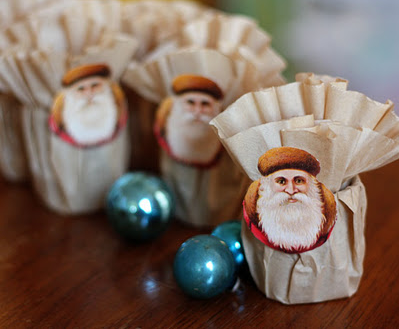
Χριστουγεννιάτικη κατασκευή με φίλτρα από καφέ!


  • <p>Μια πρωτότυπη και ιδιαίτερα όμορφη χριστουγεννιάτικη κατασκευή. Φτιάξτε εύκολα και γρήγορα αυτά τα όμορφα στολίδια με τα πιο απλά υλικά που υπάρχουν σε κάθε σπίτι.</p>

Θα χρειαστούμε φίλτρα του καφέ, ρολά από χαρτιά υγείας και μια χριστουγεννιάτικη φιγούρα τυπωμένη σε απλό χαρτί.

Κόβουμε τα ρολά από το χαρτί υγείας να γίνουν ελαφρώς πιο κοντά.

Τα ντύνουμε με ένα φίλτρο του καφέ.

Παίρνουμε ένα ακόμη και φτιάχνουμε ένα λουλούδι.

Το τοποθετούμε μέσα στο ρολό, το διπλώνουμε και κολλάμε τη φιγούρα που θέλουμε.

KyRwLog.jpg

φωτογραφίες από auntpeaches.com

Σχόλια Χρηστών

Recommended Comments

Δεν υπάρχει κάποιο σχόλιο

Account

Navigation

Αναζήτηση

Configure browser push notifications

Chrome (Android)
  1. Tap the lock icon next to the address bar.
  2. Tap Permissions → Notifications.
  3. Adjust your preference.
Chrome (Desktop)
  1. Click the padlock icon in the address bar.
  2. Select Site settings.
  3. Find Notifications and adjust your preference.