

Μετάβαση σε περιεχόμενο
View in the app

A better way to browse. Learn more.

Mammyland

A full-screen app on your home screen with push notifications, badges and more.

To install this app on iOS and iPadOS
  1. Tap the Share icon in Safari
  2. Scroll the menu and tap Add to Home Screen.
  3. Tap Add in the top-right corner.
To install this app on Android
  1. Tap the 3-dot menu (⋮) in the top-right corner of the browser.
  2. Tap Add to Home screen or Install app.
  3. Confirm by tapping Install.

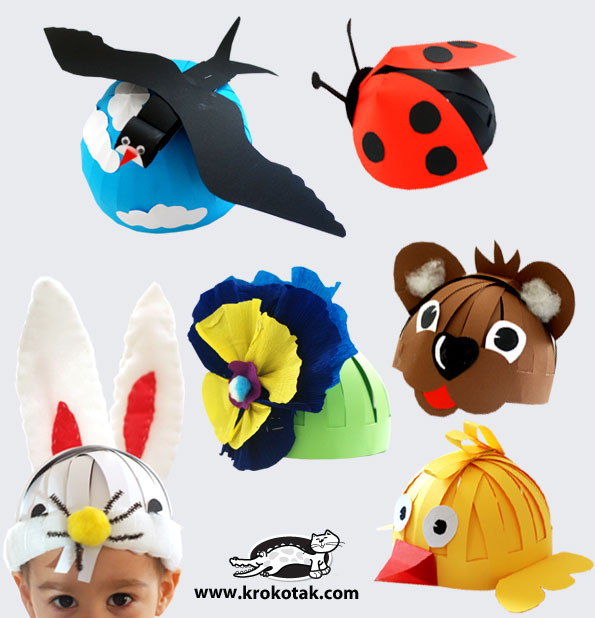
Χάρτινα καπέλα με ζωάκια!


  • <p>Ο δημιουργικός χρόνος που περνάμε με το παιδί μας είναι ανεκτίμητος!</p>

Μια όμορφη ιδέα είναι να φτιάξουμε καπέλα από χαρτόνι που αναπαριστούν διάφορα ζωάκια. Το μόνο που θα χρειαστούμε είναι χαρτόνι, κόλα, ψαλίδι και φυσικά τη βοήθεια και τη φαντασία του αγαπημένου μας λιλιπούτειου βοηθού!

Καλή διασκέδαση!

5RLKsO7.jpg

ccx5yrr.jpg

NVB93Gn.jpg

7MrLxDp.jpg

u6T5gpy.jpg

6uFQ79i.jpg

aGcDwxw.jpg

9fM3k9J.jpg

wJvki8p.jpg

Σχόλια Χρηστών

Recommended Comments

Δεν υπάρχει κάποιο σχόλιο

Account

Navigation

Αναζήτηση

Configure browser push notifications

Chrome (Android)
  1. Tap the lock icon next to the address bar.
  2. Tap Permissions → Notifications.
  3. Adjust your preference.
Chrome (Desktop)
  1. Click the padlock icon in the address bar.
  2. Select Site settings.
  3. Find Notifications and adjust your preference.