

Μετάβαση σε περιεχόμενο
View in the app

A better way to browse. Learn more.

Mammyland

A full-screen app on your home screen with push notifications, badges and more.

To install this app on iOS and iPadOS
  1. Tap the Share icon in Safari
  2. Scroll the menu and tap Add to Home Screen.
  3. Tap Add in the top-right corner.
To install this app on Android
  1. Tap the 3-dot menu (⋮) in the top-right corner of the browser.
  2. Tap Add to Home screen or Install app.
  3. Confirm by tapping Install.

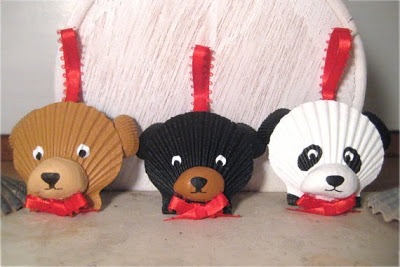
Φατσούλες - ζωάκια από κοχύλια!


  • <p>Μια υπέροχη καλοκαιρινή κατασκευή με κοχύλια που σίγουρα έχετε μαζέψει με τις βολτούλες στην παραλία!</p>

Συγκεντρώστε μερικά κοχύλια και αρχίστε να φτιάχνετε αυτές τις πανέμορφες φατσούλες από ζωάκια! Σκυλάκια, γατούλες, αρκουδάκια, γουρουνάκια και ότι άλλο μπορείτε να φανταστείτε!

wShpzgL.jpg

r4lKn2P.jpg

DwCIf4d.jpg

nP7uJYb.jpg

5i9LAdz.jpg

RK2AZUC.jpg

sRahN5Z.jpg

BgCMsxx.jpg

uBG8PqC.jpg

wo4sLI7.jpg

Y3ZiedQ.jpg

Σχόλια Χρηστών

Recommended Comments

Δεν υπάρχει κάποιο σχόλιο

Account

Navigation

Αναζήτηση

Configure browser push notifications

Chrome (Android)
  1. Tap the lock icon next to the address bar.
  2. Tap Permissions → Notifications.
  3. Adjust your preference.
Chrome (Desktop)
  1. Click the padlock icon in the address bar.
  2. Select Site settings.
  3. Find Notifications and adjust your preference.