

Μετάβαση σε περιεχόμενο
View in the app

A better way to browse. Learn more.

Mammyland

A full-screen app on your home screen with push notifications, badges and more.

To install this app on iOS and iPadOS
  1. Tap the Share icon in Safari
  2. Scroll the menu and tap Add to Home Screen.
  3. Tap Add in the top-right corner.
To install this app on Android
  1. Tap the 3-dot menu (⋮) in the top-right corner of the browser.
  2. Tap Add to Home screen or Install app.
  3. Confirm by tapping Install.

Λουλούδια στο κοριτσίστικο δωμάτιο!


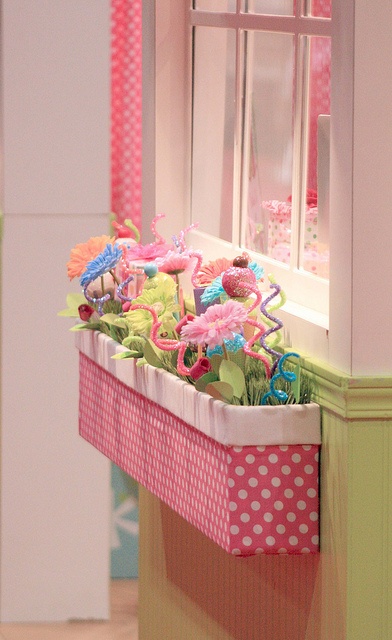
  • <p>Μια πολύ όμορφη, χαρούμενη και πρωτότυπη κατασκευή για το δωμάτιο της μικρής σας πριγκίπισσας!</p>

Ιδανική κατασκευή για να στολίσουμε τα παράθυρα και να δώσουμε μια άκρως λουλουδάτη νότα στο κοριτσίστικο δωμάτιο.

Φτιάξτε το πανεύκολα χρησιμοποιώντας ένα χάρτινο κουτί το οποίο θα ντύσετε με το ύφασμα της αρεσκείας σας και γεμίστε το με πλαστικά πολύχρωμα λουλούδια! Μπορείτε να στερεώσετε τη ζαρντινιέρα στον τοίχο ή να την τοποθετήσετε οπουδήποτε αλλού απλά για διακόσμηση!

JgMMR0Q.png

Σχόλια Χρηστών

Recommended Comments

Δεν υπάρχει κάποιο σχόλιο

Account

Navigation

Αναζήτηση

Configure browser push notifications

Chrome (Android)
  1. Tap the lock icon next to the address bar.
  2. Tap Permissions → Notifications.
  3. Adjust your preference.
Chrome (Desktop)
  1. Click the padlock icon in the address bar.
  2. Select Site settings.
  3. Find Notifications and adjust your preference.