

Μετάβαση σε περιεχόμενο
View in the app

A better way to browse. Learn more.

Mammyland

A full-screen app on your home screen with push notifications, badges and more.

To install this app on iOS and iPadOS
  1. Tap the Share icon in Safari
  2. Scroll the menu and tap Add to Home Screen.
  3. Tap Add in the top-right corner.
To install this app on Android
  1. Tap the 3-dot menu (⋮) in the top-right corner of the browser.
  2. Tap Add to Home screen or Install app.
  3. Confirm by tapping Install.

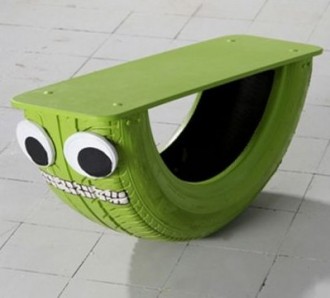
Καρεκλάκι-κούνια από λάστιχο αυτοκινήτου! Μια ιδέα που θα αγαπήσει κάθε παιδί!!


  • <p><strong>Θα χρειαστείτε:</strong> λάστιχο αυτοκινήτου, ένα κομμάτι κόντρα πλακέ, μπογιά, μαρκαδόρο!</p>

Aπλά βρείτε ένα λάστιχο αυτoκινήτου,κόψτε το στην μέση και καρφώστε ένα κομμάτι κόντρα πλακέ.Βάψτε το στο αγαπημένο χρώμα του παιδιού σας, κάτι έντονο για να του τραβήξει την προσοχή θα ήταν ιδανικό.

Για ματάκια μπορείτε να καρφώσετε ή να συράψετε δυο κομμάτια από ύφασμα ή κάποιο μαλακό υλικό. Ζωγραφίστε στοματάκι και το παιχνιδάκι του είναι έτοιμο!!!

Σίγουρα θα ξετρελαθεί από την πρώτη στιγμή... :)

Σχόλια Χρηστών

Recommended Comments

Δεν υπάρχει κάποιο σχόλιο

Account

Navigation

Αναζήτηση

Configure browser push notifications

Chrome (Android)
  1. Tap the lock icon next to the address bar.
  2. Tap Permissions → Notifications.
  3. Adjust your preference.
Chrome (Desktop)
  1. Click the padlock icon in the address bar.
  2. Select Site settings.
  3. Find Notifications and adjust your preference.