

Μετάβαση σε περιεχόμενο
View in the app

A better way to browse. Learn more.

Mammyland

A full-screen app on your home screen with push notifications, badges and more.

To install this app on iOS and iPadOS
  1. Tap the Share icon in Safari
  2. Scroll the menu and tap Add to Home Screen.
  3. Tap Add in the top-right corner.
To install this app on Android
  1. Tap the 3-dot menu (⋮) in the top-right corner of the browser.
  2. Tap Add to Home screen or Install app.
  3. Confirm by tapping Install.

Όταν το μωράκι κλωτσάει! (βίντεο)


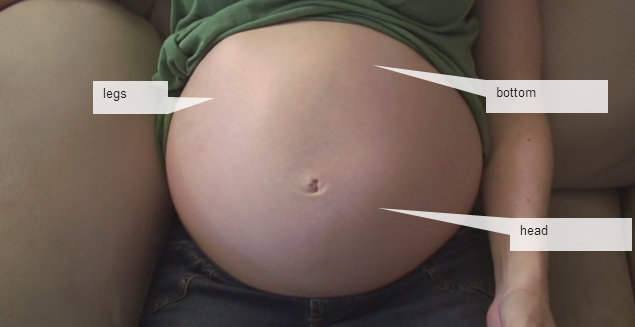
  • <p>Αυτό το βίντεο είναι ένα ολιγόλεπτο απόσπασμα που δείχνει τις κινήσεις του εμβρύου μέσα στην κοιλίτσα της μανούλας του.</p>

Με λίγη προσοχή θα μπορείτε να διακρίνεται το κεφαλάκι του που είναι είναι στραμμένο αριστερά, τα ποδαράκια του που βρίσκονται επάνω και το ένα χτυπάει την αριστερή πλευρά της κοιλιάς και τα χέρια του που είναι προς τα κάτω.

Απολαύστε τον αγέννητο Torri που κάνει αισθητή την παρουσία του στην κοιλίτσα της μαμάς του στις 36 εβδομάδες της κύησης!

Σχόλια Χρηστών

Recommended Comments

Δεν υπάρχει κάποιο σχόλιο

Account

Navigation

Αναζήτηση

Configure browser push notifications

Chrome (Android)
  1. Tap the lock icon next to the address bar.
  2. Tap Permissions → Notifications.
  3. Adjust your preference.
Chrome (Desktop)
  1. Click the padlock icon in the address bar.
  2. Select Site settings.
  3. Find Notifications and adjust your preference.